



Resources
Clay
Find prospects. Research accounts. Personalize outreach



Research notes
Don’t be a dummy like me and just try to use the hosted Clay MCP server to give Claude Code access to Clay. Install the plugin.
Interestingly, the clay MCP has no built-in way to query your tables (which was the first thing I tried to do).
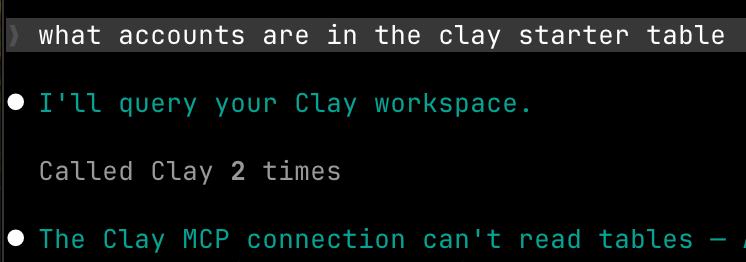
After digging around in the published tools/descriptions, it looks like the MCP is mainly for searching through your CRM and enriching account and contact data.
Turns out, if you wanna use Clay the right way from your agents, you really need to install the Clay plugin. Once you point your agent at https://github.com/clay-run/agent-plugins/blob/main/GETTING_STARTED.md and ask it to setup Clay, it’ll mostly do the right thing and get you going with the CLI, skills, and a local MCP server.
- The
claycli (~/.claude/plugins/cache/clay-plugins/clay/<version>/bin/clay) is a little shell script. It reads a pinned CLI version out of acli-versionfile sitting next to it then downloads the real binary from the matchingclay-cli-v0.3.0release inclay-run/agent-pluginsthe first time you run it. Pretty neat. - Once the cli is installed, you’ll go through
clay login, which opens a browser and drops an access token and a refresh token into~/.config/clay/config.json, chmod 600, underprofiles.default.oauth. It validates the credential against Clay before writing anything, so a failed login doesn’t leave you with a half-written config. - The MCP server entry is just
{"command": "clay", "args": ["mcp"]} - another neat trick -
PreToolUsehooks to auto-approveclay ...,mcp__plugin_clay_clay__*, etc with some looking out for semi-colons, pipes, and other ways to potentially exploit the approvals.
MCP tools
Clay runs 2 MCP servers with no tools in common, 26 between them. Checked against the live servers on August 12, 2026.
Each tool lists its call parameters: required optional
Hosted
Remote, over HTTPhttps://api.clay.com/v3/mcp
Installs as a connector. Prospecting, enrichment, and the workspace's own accounts and deals.
CRM data
-
query-objectsPlain-language query over accounts, contacts, or deals, auto-detecting which. The only source of the numeric entity IDs the next tool needs.
- query
- audienceName
- onlyMine
- limit
- offset
-
ask-question-about-accountsAnalytical question against one to ten named accounts. Reads their contacts, opportunities, Gong calls, and emails.
- accountIds
- question
Enrichment
-
find-and-enrich-companyCosts creditsResolve one company by domain or LinkedIn URL, returning firmographics plus associated contacts. Names alone fail. Creates a new task.
- companyIdentifier
- companyDataPoints
-
find-and-enrich-contacts-at-companyCosts creditsFind types of people at one company, filtered by title, profile keyword, school, certification, language, location, or tenure. Always scoped to a named company.
- companyIdentifier
- contactFilters
- dataPoints
-
find-and-enrich-list-of-contactsCosts creditsResolve specific named people. The only tool that builds a row set spanning more than one company.
- contactIdentifiers
- dataPoints
-
add-company-data-pointsCosts creditsAppend company columns to an existing task. Omitting entityIds enriches every company in it.
- taskId
- dataPoints
- entityIds
-
add-contact-data-pointsCosts creditsThe same for contacts.
- taskId
- dataPoints
- entityIds
Subroutines
-
list_subroutinesLists the workspace functions and their inputs. Its own description is templated with the live list, so it differs per workspace.
-
get_subroutine_input_optionsFetch the dropdown options for an input with a configured options source.
- subroutine_id
- inputName
-
run_subroutineCosts creditsRun a function over entities in an existing task. You author the mapping as { entityField: subroutineInput }.
- subroutine_id
- taskId
- entityIds
- fieldMapping
-
run_subroutine_no_mappingCosts creditsThe same run with the backend generating the field mapping. Supersedes run_subroutine.
- subroutine_id
- taskId
- entityIds
- inputs
-
run_subroutine_directCosts creditsRun on raw values with no existing task, up to 1,000 input sets. Preferred when you have concrete inputs. Bills per input set.
- subroutine_id
- inputs
Tasks
-
get-task-contextThe read path. Returns every entity plus enrichment values and per-enrichment state (completed, in-progress, error). The only way to see enrichment results. Free and idempotent.
- taskId
- entityIds
- page
-
get-taskTask status and results. Documented as a private tool the widget uses for polling, so prefer get-task-context.
- taskId
- page
Utilities
-
get-current-workspaceReturns workspaceName, workspaceId, and workspaceUrl. The connection is pinned to one workspace at auth time.
-
get-credits-availableBooleans only: hasWorkspaceCredits, hasSalesRepCredits, hasBudgetCredits. No numeric balance.
-
track-eventWrites an analytics event into Clay telemetry. Not for model use.
- eventName
- properties
Notes
- Every find-and-enrich-* call creates a new task, and the enrichment tools appear to create a hidden table behind it.
- A task's rows are frozen at creation. The add-*-data-points tools and the subroutines add columns, not rows.
- Task IDs are time-ordered: 19-character base62 bodies with a monotonic leading segment, so sorting them lexicographically sorts them by creation. No documented TTL, but they survive hours at least.
- A task is a working set of entities, not a request and not strictly a search. Search tasks carry both an mcp-task-* and a legacy cgas-search-id-*; direct tasks from run_subroutine_direct have no search ID.
- No table or workbook access, and no company discovery by criteria.
Local
Local, over stdioclay mcp
Run by the Clay CLI on your machine. Authoring, validating, and testing workflows, plus the resources they hang off.
Workflows
-
readRead a workflow graph, or one node with its prompt, code, tools, edges, and config. Caches to the sandbox filesystem so you can grep it.
- workflowId
- nodeId
- mode
-
edit_nodeCreate, update, or delete a workflow node. Omit nodeId to create, pass it to update, pass it with delete to remove.
- workflowId
- nodeId
- delete
- nodeType
- name
- description
- agentName
- agentPrompt
- agentPrompt__replace
- agentModel
- code
- code__replace
- codeTimeoutMs
- tools
- inputSchema
- outputSchema
- recentOutputPaths
- conditionalConfig
- incomingEdges
- outgoingEdges
- id
- position
- retryConfig
- batchRunSettings
-
validate_workflowCheck a workflow's structure and execution-readiness. Passing prettier auto-cleans and re-lays-out the graph.
- workflowId
- prettier
Testing
-
execute_clay_actionCosts creditsRun a single Clay action to see its raw output. For testing an action before wiring it into a node, not for production runs.
- actionPackageId
- actionKey
- inputs
-
run_codeRun Python in a sandbox to test logic before it goes in a code node. Must define handler(context) returning a dict.
- code
- inputs
Resources
-
surfaces_listList resources of a type. Returns items, total, and hasMore.
- resourceType
- limit
- offset
- search
-
surfaces_readRead one trigger, table, or function by ID.
- resourceType
- resourceId
-
surfaces_edit_triggerCreate, update, or delete a trigger. Which trigger.* fields matter depends on triggerType, which spans manual, webhook, scheduled, CSV upload, Clay table, and three audience flavors.
- resourceId
- delete
- trigger.workflowId
- trigger.triggerType
- trigger.inputSchema
- trigger.segmentId
- trigger.entityType
- trigger.signalId
- trigger.triggerTableId
- trigger.triggerFieldId
- trigger.scheduleConfig
- trigger.snapshotId
- trigger.workflowNodeId
- trigger.createTriggerNode
-
tableIn schema mode returns columns, types, and row counts; in query mode searches rows in natural language, which needs taskDescription in practice.
- tableId
- mode
- taskDescription